Alert Management
The Alert Management feature allows you to create and manage custom alerts based on specific criteria within your project.
Accessing Alert Management
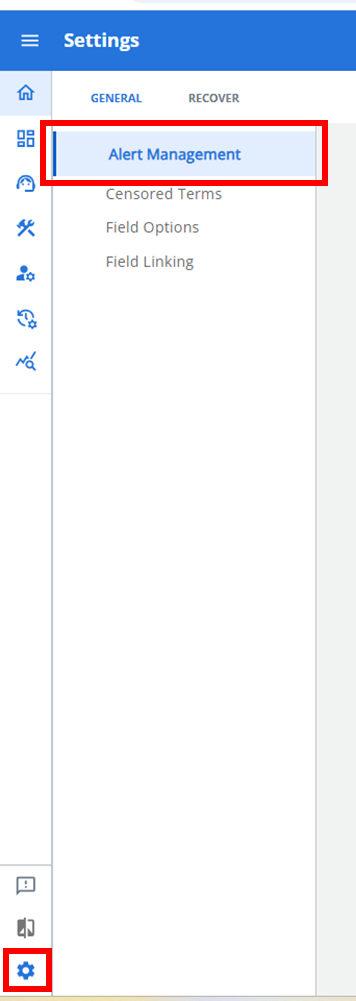
Navigate to Admin Settings > General tab > Alert Management to access this feature.
Creating a New Alert
-
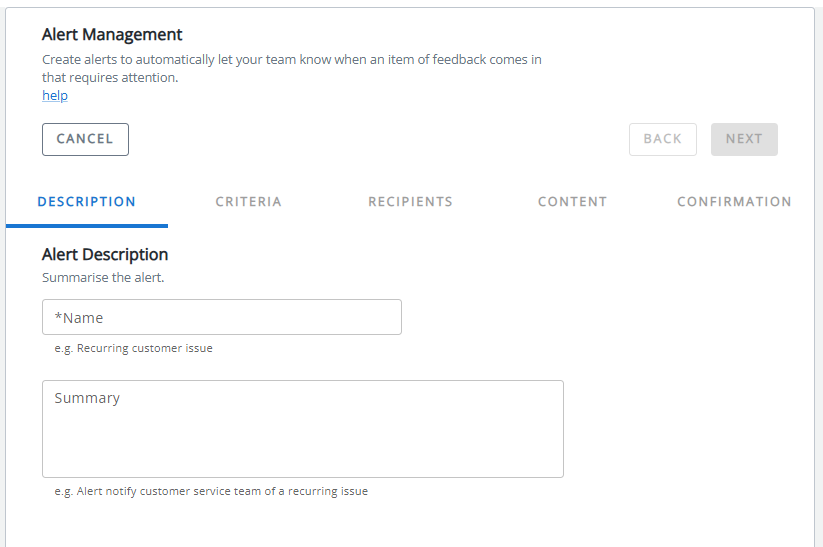
Click the ALERT button to launch the alert creation wizard.
-
Complete each tab of the wizard:
-
Description: Unique name and describe your alert.
-
Criteria: Set filters from Dashboard that will trigger the alert.
-
Rant & Rave Recipients: Select internal team members to receive the alert.
-
External Recipients: Add email addresses or phone numbers for external stakeholders.
-
Content: Customize the alert message content.
-
Confirmation: Review and confirm alert settings.
-
Managing Existing Alerts
From the Alert Management page, you can:
-
View all configured alerts in a list format.
-
Search for specific alerts using the search bar.
-
Expand an alert to view its complete configuration.
-
Edit an alert by selecting it and modifying any tab.
-
Delete an alert that is no longer needed.
Note: When adding external recipients, the system automatically validates email addresses and phone numbers to ensure proper delivery.