Release Notes (Year 2025)
Here you’ll find information on releases and bug fixes from the year 2025. For older release notes, read our Archived Release Notes article. For latest release notes, see Latest Releases.
| Release | Feature and Fixes |
|---|---|
| November 2025 |
Bug Fixes |
| October 2025 |
Dashboard and Messages UI Improvements Settings Search Experience Enhancement |
| September 2025 |
File Submit+ Application Dashboard Components Configuration Cog Bug Fixes |
| August 2025 |
Integrated Metadata UI Updated all Upland URLs to Mobile Commons URLs Fixed Menu Selection Alignment New Metadata Field Management Features Bug Fixes Other User Experience, Technical, and Platform Improvements |
| July 2025 |
Administration Settings Dashboard 2.0 Quick Search Bar User Profile Column Selection Bug Fix |
| May 2025 |
Rant & Rave's Relationships View |
November 2025
Bug Fixes
-
Field Linking – Display Name of the Metadata Field
The Field Linking sections previously displayed the Field Name of metadata fields. The application now displays the Display Name (the user-friendly label).
-
Dashboard - Filter Panel - Restrict To Category
Addressed UI issues in the filter panel of the dashboard, specifically in the Group Selection or Tree Structure section.
-
Dashboard – Flagging Rules
Fixed issues with the dragging and dropping items in the flagging rules section of the dashboard, resulting in a fully functional in-app solution.
-
Message Ticker-Clicked Messages Not Highlighted in the Sorted Message Table
Fixed an issue where clicking a message from the message ticker did not highlight the corresponding message in the message table when it was sorted. The correct message is now highlighted regardless of sorting.
-
Dashboard – Widgets Resizing
Fixed an issue where widgets did not display fully within their containers when resized. Widgets now display fully within their containers when resized, ensuring a more consistent dashboard experience.
-
Field Options – Display Name of the Metadata Field
The Field Options section previously displayed the Field Name of metadata fields. The application now displays the Display Name (the user-friendly label).
October 2025
Dashboard & Messages UI Improvements
Enhanced Messages Panel Display
Improved the Messages Tab layout to provide a better viewing experience. The messages table now extends to the full height of the page, eliminating unnecessary white space and allowing you to view more of your message history at once without scrolling.
Benefits:
-
Maximized screen real estate for message viewing.
-
More efficient workflow when reviewing message lists.
-
Improved visual consistency across the platform.
Dashboard Filter Panel Enhancements
Resolved several UI issues within the Dashboard Filter Panel to ensure a smoother filtering experience:
-
Fixed display issues with the "Words" filter section, including proper visibility of filter counts.
-
Improved the "Overall Sentiment" filter functionality.
-
Enhanced overall filter panel layout and visual consistency.
Benefits:
-
More intuitive filtering controls.
-
Improved visibility of active filters.
-
Better overall dashboard navigation experience.
Settings Search Experience Enhancement
Standardized Search Box Behavior Across Settings
Improved the consistency and usability of search functionality throughout the Settings area of the platform. All search boxes now follow a unified, intuitive design pattern.
What's Changed:
Search boxes have been updated across the following Settings sections:
-
Alert Management: Search for alerts by name, plus improved search within the Create Alert screens (Criteria, Recipient, and Content tabs).
-
Censored Terms: Find censored terms quickly.
-
Field Linking: Search through field configurations.
-
Message Templates: Locate templates efficiently.
-
Fields: Search your custom fields.
Benefits:
-
Consistent Experience: All search boxes now behave the same way, reducing confusion and learning time.
-
Cleaner Interface: When you focus on a search box, the placeholder text becomes a label, keeping the field clear and easy to use.
-
Improved Usability: Standardized behavior makes it easier to navigate and find what you need across all Settings areas.
September 2025
Features and Improvements
New Features
-
File Submit+ Application is now available in Rant & Rave. It is a simple and user-friendly tool that allows you to upload files for solicitations with confidence. Before your file is used, the application automatically validates key details such as recipient, workflow, schedule, and other metadata. If there are any errors, you will be notified so that you can correct them before uploading the file again. This ensures that your data is accurate and complete, helping you avoid issues, save time, and manage solicitations smoothly and reliably. To learn more, refer to File Submit + Application.
-
Dashboard Components Configuration Cog to provide a better user experience when configuring data in Dashboard widgets.
Bug Fixes
-
SMS Alert Service Restoration: Resolved a critical issue where SMS alerts were not being sent to customers. The alert notification service has been fully restored and is now operating normally across all environments, ensuring customers receive timely SMS notifications as expected.
-
Alert Management: Fixed an issue where an external user was removed after a user added an external user, selected team members, and then returned to external.
-
When a user edits an alert, duplication logic is now applied as expected against various fields.
-
Resolved a blank screen issue on the Alert Management "External Recipients" page.
Platform Impact
These updates reflect our ongoing commitment to providing you with a reliable, user-friendly Rant & Rave platform experience. Each improvement is designed to enhance your workflow and ensure optimal performance.
Support & Feedback
If you have any questions about these updates or encounter any issues, please contact us:
-
Support Email: rr_support@mobilecommons.com.
-
Technical Support: Available through your usual channels.
-
Feedback: We welcome your input on Rant & Rave platform improvements.
We’re dedicated to continuously improving Rant & Rave platform to provide you with the best possible experience. These updates reflect our ongoing commitment to excellence and innovation.
August 2025
Features and Improvements
• Integrated Metadata UI in the "Admin Settings" page.
• Updated all Upland URLs to Mobile Commons URLs across all Rant & Rave platforms.
• Investigated and fixed menu selection alignment in Admin Panel and Dashboard 2.0.
New Metadata Field Management Features
Several enhancements have been made to the Metadata Field Management capabilities in Rant & Rave:
New Features
-
View All Metadata Fields: Project administrators can now access a comprehensive view of all customer metadata fields in Settings → Metadata Field Management. The interface includes search functionality, column sorting, and clear indicators for field type, name, display name, editability, visibility, and order. Unstructured-text fields are displayed as locked read-only.
-
Field Editability Controls: Administrators can now set each metadata field to Default (editable) or Protected/Read-Only using an inline dropdown menu. These changes take effect immediately, while unstructured-text fields remain locked for data integrity.
-
Visibility Management: A new toggle allows administrators to switch fields between Visible and Hidden states directly in the table. Visibility changes apply in real time to all users, providing immediate control over what information appears in your interface.
These enhancements give administrators more control over metadata fields while maintaining data integrity and improving the overall user experience.
To learn more, refer to Metadata Field Management.
Bug Fixes
-
Resolved an issue where users could not update an existing Alert from the Alert Management application.
-
Made UIX improvements to correct the text displayed on the Recipients tab, ensuring better readability and a more consistent user interface.
-
Addressed multiple quality-of-life issues across all Dashboard 2.0 tabs.
-
Improved message UIX for closed and open tasks in Recover 2.0.
-
Improved Dashboard 2.0 edit layout mode for better usability.
-
Fixed dragging and dropping functionality for widgets from widget layout to widget panel in Dashboard 2.0 edit layout.
-
Fixed a positioning issue where dashboard widgets were rendering outside their designated container boundaries, ensuring proper display and functionality within Dashboard 2.0 interface.
Other User Experience, Technical, and Platform Improvements
-
Platform Stability: Multiple improvements to ensure reliable performance.
-
User Experience: Enhanced interfaces and streamlined workflows.
-
Feature Enhancements: New capabilities and improved functionality.
-
Technical Improvements: Behind-the-scenes optimizations for better platform performance.
Support & Feedback
If you have any questions about these updates or encounter any issues, please contact us:
-
Support Email: rr_support@mobilecommons.com.
-
Technical Support: Available through your usual channels.
-
Feedback: We welcome your input on Rant & Rave platform improvements.
We’re dedicated to continuously improving Rant & Rave platform to provide you with the best possible experience. These updates reflect our ongoing commitment to excellence and innovation.
July 2025
Administration Settings
The Admin Settings features allow you to customize and manage various aspects of your Rant & Rave implementation.
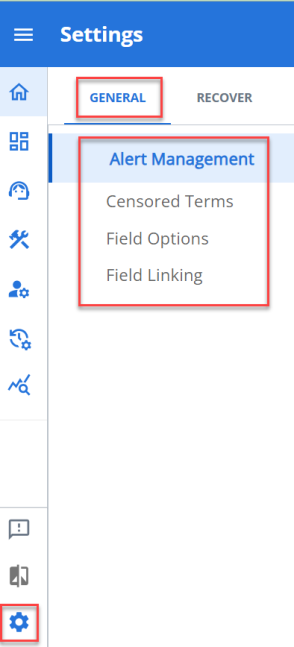
Admin Settings - General Tab:
-
Alert Management: Alert Management allows you to create and manage custom alerts based on specific criteria within your project.
-
Censored Terms: Censored Terms allows you to manage words or phrases that should be automatically filtered from customer feedback.
-
Field Options: Field Options allows you to customize the available options for dropdown fields used in the Dashboard Filter and other selection-based inputs in your forms.
-
Field Linking: Field Linking enables you to create dependencies between fields, where the options in one field change based on selections made in another field.
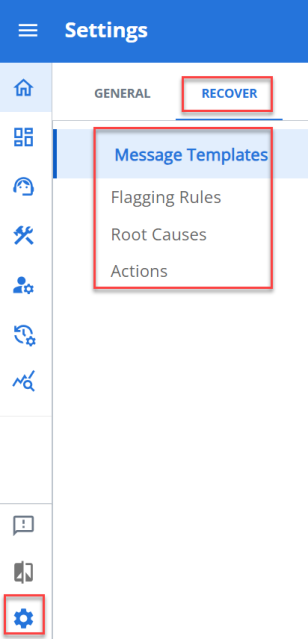
Admin Settings - Recover Tab:
-
Message Templates: Message Templates allows you to create and manage reusable message formats for customer communications.
-
Flagging Rules: Flagging Rules allows you to set up automated rules for flagging specific types of feedback that require attention.
-
Root Causes: Root Causes allows you to categorize feedback by underlying issues, helping you track and address systemic problems.
-
Actions: Actions allows you to define standard response actions that can be taken when addressing customer feedback.
To learn more, refer to Administration Settings.
Dashboard 2.0 Quick Search Bar Enhancement
What's New
A new quick search bar has been added to the Dashboard 2.0. This new feature allows you to instantly filter dashboard content using keywords, making it easier to find exactly what you need.

Benefits
-
Save Time: Find relevant information with a simple keyword search instead of configuring complex filters.
-
Streamlined Experience: Reduce clicks and navigation steps with the conveniently positioned search bar at the top of your dashboard.
-
Intuitive Design: Enter search terms and see them displayed as "Words: Search Term" in an easy-to-read format.
How It Works
Simply type your keywords into the new search bar located at the top of your dashboard. Results will filter instantly as you type, showing only the content that matches your search criteria. This enhancement is based on your feedback to make dashboard navigation more efficient. It will help you work more productively.
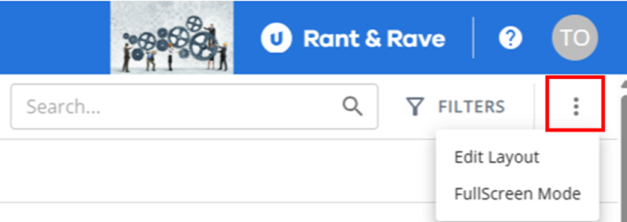
To remove clutter of buttons on the screen we have moved the Edit Layout and where available the FullScreen Mode into the More Functionality ( ) icon.
User Profile Column Selection Enhancement (in Dashboard 2.0 and Recover 2.0)
What's New
Security and data privacy controls in Dashboard 2.0 and Recover 2.0 have been improved by implementing profile-based column selection. User Administrators can now restrict which Project Fields are visible to specific users, ensuring sensitive information is only accessible to authorized personnel.
Benefits
-
Enhanced Security: Protect sensitive and personally identifiable information (PII) by controlling field visibility.
-
Customized Views: Tailor user experiences based on role and access requirements.
-
Simplified Interface: Users only see relevant fields, reducing complexity and improving focus.
Details
When navigating to any part of Dashboard 2.0 or Recover 2.0 users will now only see Project Fields that have been explicitly assigned to their profile(s). This feature respects all profile column selections across the entire application, ensuring consistent data protection throughout the user experience as was the case in Dashboard 1.0.
Bug Fix
-
Resolved an issue where the Download button was not working properly across all widgets on Dashboard 2.0. You can now successfully download content from any widget in the system without interruption.
May 2025
Rant & Rave's Relationships view, which was available in Dashboard 1.0, is now available in Dashboard 2.0 as well. This feature helps users visualize how feedback categories like “Billing” or “Product” are interconnected through sentiment—positive, negative, or neutral. It reveals patterns in customer feedback, helping identify areas that need attention and understand how changes in one category may influence others.
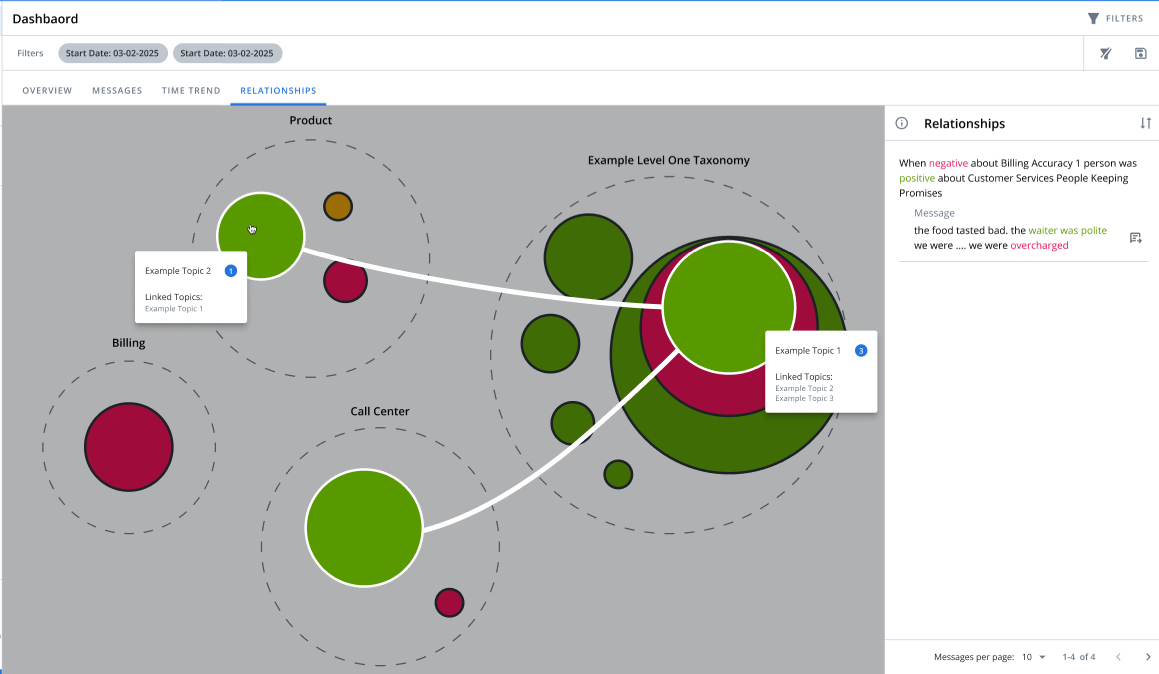
Visual elements like large dashed circles and colored bubbles represent categories and commonly used words, with bubble size indicating frequency. Users can hover or click to explore mention counts and related terms, while the Relationships panel allows sentiment filtering, easy navigation to feedback, and control over the number of items displayed.
To learn more, refer to Relationships on the Dashboard 2.0.